now | blog | wiki | recipes | bookmarks | contact | about | donate
* * * back home * * *
a tiling-first, aesthetic linux distribution
2026-10-20
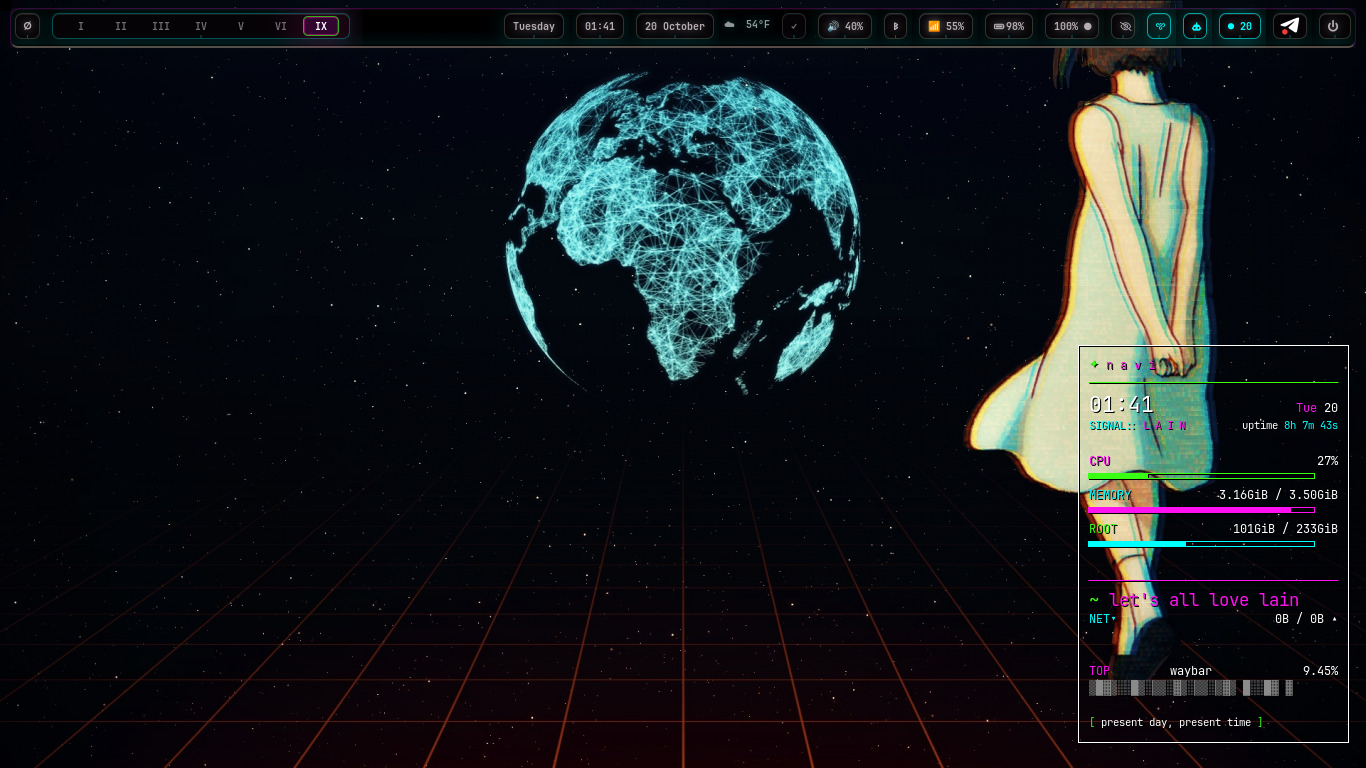
I've been writing about it here for quite awhile, but last month, we finally began shipping images. What I'm referring to is navi, our very own linux distribution.
navi aims to celebrate the spirit of the "Wired", a Serial Experiments Lain reference that means the blending of the line between the internet and real life. You'll find Lain references all over the distro, as it is one of the things that influenced this whole adventure - me wanting to build my own "Navi computer" like that found in the anime. navi is your window to the smallweb, and your home for your agents, if you choose to use them.
A long time ago, I had a thought - what could linux look like if it were stripped all the way back to my favorite way of working, using tiling window managers, removing as much GTK/Qt as possible to avoid those aesthetics mixups that are so common, build up a design language for cohesion, base it on top of my favorite rock-solid foundation (Debian), and use web technologies in the place of standard linux toolkits to keep everything accessible and consistent?
We finally have the answer, and I am super proud to say that navi ships today and is available to download for everyone. It has technically been out for over a month publicly, but I have not had the time to sit down and finally write up a blog post about it. This is probably going to get a little lengthy, as I've been meaning to write it up forever now, but I'm going to try to keep from rambling too much about it and show you some of the main things I'm especially proud of.
navi is meant to be beautiful and aesthetic, while being the most functional desktop you ever used. You can use our keybindings to absolutely fly across the system, and enjoy how your desktop looks while doing it. You don't have to worry about dragging windows around with the mouse - navi rejects the old, traditional desktop paradigm of floating windows and a taskbar with icons all over it. We prefer the tiling, keyboard-centric approach to managing our desktop.
navi's desktop is called 'Wired'. The Wired shell consists of heavy modifications of several things, the Sway tiling window manager, the Waybar panel, Rofi and dmenu as run launchers, and Conky for displaying system information. All of this is of course styled in our nightshadeNeon theme, and the desktop shell is meant to feel alive. We have subtle little animations in several of our Waybar themes, for example, and we also support animated wallpapers using gifpaperslain, our own tool built around mpvpaper to render animated wallpapers. If you prefer static wallpapers, you can select one using naviWalls.
You don't have to worry about randomly discovering keybinds, either, because you can easily access the helpful navi manual to teach you how to use it. You can either access the manual by opening it up locally using the learn command, or you can visit the online manual to see it in your browser.
navi has a lot of things that give it its identity.
The first and most obvious thing is the "nightshadeNeon" design language. It is used across all of our stuff here at xvoidsx - from our websites (like the very one you are reading right now), our social instances, our desktop applications, our TUIs, and everything. Designed by my wife and I, nightshadeNeon is the cohesive core that blends all of our interfaces together, and it shapes how navi itself looks. Neon colors and consistent dark themes guide the way to give it a bit of a cyberpunk feel.
We also have a suite of navi software that ships with the distro. These come in the forms of navi mods, webapps, and desktop apps, which are written on Electron to allow us to shape as much as possible with web technologies.
As you can imagine, all of our homegrown or forked navi software is written in nightshadeNeon, keeping everything cohesive and beautiful.
"Why Electron?", I can hear some folks asking, and the answer is quite simple. Electron, being web tech at the core, allows for us and anyone who works with us to be able to easily contribute. More people know web technologies and their associated languages (HTML/CSS/JS) than any other language, so the barrier of entry to writing and contributing to navi apps is negligible. Agents are also very good at web stuff, and agents are welcome, as you will see shortly, in navi.
Our current Electron app stack:
The navi mods I mentioned are TUI applets, many of which live directly in navi's panel, which is a heavily configured waybar. navi mods are written in Go, using Bubble Tea and Lip Gloss. There are many navi mods that ship with the distro, and I won't name them all here as some are strictly for system configuration, but the main ones are:
herdr panes for conversations, see if they need your attention, connect API keys if you choose to use cloud agents, set levels of agent autonomy, and more.Like Electron desktop apps, webapps are first-class citizens on navi. We use Chromium as a webapp runtime, allowing us to use its --app mode to render webapps as beautiful, chromeless windows that look native. We ship a few of our own webapps, as well as loads of other webapps - a few by default, loads more which you can install yourself.
Here are a few of our own webapps that ship with navi:
navi-get to handle installations automatically.Sometimes, there is something we want to achieve that an existing piece of software is already doing well, and we want to extend on top of it. Here are a few of the apps that ship out of the box with navi that originated as forks of other, great software.
navi is a little opinionated in the things we ship, as the goal is to provide a beautiful and usable tiling system right out of the box, so you can get it installed and jump right into the Wired.
navi relies on Chromium for the webapp runtime, and so we ship a couple of Chromium-based browsers out of the box so you can choose which one you want to use, or install another right from navi-get. Chromium's wonderful --app flag makes our webapp story possible, and I've loved the Chromium platform for a long time anyway, so it feels completely natural anyway.
For anyone who doesn't prefer to use a Chromium-based browser, Firefox is available as well! We want everyone to be able to access the web however they prefer. At the moment, the Chromium runtime is the only story for webapps, as Firefox's webapp support is not complete and there is no support for chromeless windows.
Alacritty is currently navi's default terminal, until we deem Copland to be stable enough to take over that job. We also ship a few GTK tools, including Nemo as the file manager and Filezilla so you can interact with remote servers if you run any. Filezilla is a huge part of my day-to-day operations, and having it in by default on new installations of navi is great without having to remember to go back and install it later. For GTK stuff we ship, to ensure everything is cohesive, we also have our own nightshadeNeon GTK theme so that any GTK app that gets installed on the system looks right at home.
For smallweb browsing, we ship my favorite Gemini browser, Amfora. It runs in the terminal and makes it very easy for you to jump into your favorite Gemini capsules right out of the box.
When it comes to getting work done, we also ship with naviVim, our own custom distribution of NeoVim, and naviCode, our own distribution of VS Codium. nightshadeNeon theme and customizations are right there so you can jump right into text editing, working with agents, whatever you want.
If you want to work with AI agents, you will have all kinds of options at your disposal. As mentioned before, we ship with Wisp, which is our OpenCode fork, and you also have access to vanilla OpenCode, OMP (Oh My Pi), Pi Agent, Goose, and loads more. The Ollama runtime is shipped out of the box to handle running local models, and if you prefer to use cloud models, you can grab things like Codex and other stuff from navi-get!
We also ship our own config on top of Hermes Agent called Lain. Lain is pre-configured to know how to access important navi documentation and the manual, so if you want to ask your agent how to work with navi or configure it to your own liking, just ask Lain!
If you want to make your computer do things using your voice, you can also run "Hey Lain!", which is our experimental voice agent. Right now, it can do things like check the weather, check the news, handle window management (say something like "Open Chromium" and it will do just that). Please note that "Hey Lain!" is not a finished thing yet, and might not work as you expect all the time. We are working on it!
We also ship a modified version of herdr which is similar to tmux, a terminal multiplexer that is agent-aware. We've made it aware of Goose agent, which natively doesn't have support for awareness of Goose, as well as given it our own custom navi-like keybinds to manage panes, and a beautiful nightshadeNeon color scheme. Herdr sessions are reported in the panel, where you can see a little robot face that displays when agents are working, idle, or need your attention. You can click into it and jump right into any agent session with ease.
You have two ways you can choose to run navi. You can run it on our stable channel, or on our rolling channel. We have an easy way built right in for you to swap channels without having to install a new image.
If you want to stick with our stable, tested, versioned releases, the mika channel is for you. Every image on the mika channel goes through our testing bench on real hardware and virtual machines to ensure that it is good to go. This is probably the way for most users.
If you want to live on the bleeding edge and grab every new navi feature as it comes along, you might want to ride the eiri channel. The rolling channel updates every time we push new code to the eiri branch of navi's repo. We've never had anything breaking happen yet, but keep in mind that it is a rolling channel, and could see breakage.
mika releases are versioned (current is 1.7 mika), and will see at least six major versions per year. eiri releases are dated, not versioned, and come out at least once a week. If want to switch channels, and you're on a mika release, you can simply run the following command to switch to the rolling branch:
navi-update --channel eiri
navi is a distro for everyone. We welcome all folks who want to have fun with their machines in a new way, a lot different than most other Linux distros, and everyone is able to show up in our channels, ask questions, file bugs, suggest ideas, send pull requests, and just shoot the breeze! Here are a few ways you can get involved with navi development or just come join the conversation: